Friday, December 14, 2007

Please Welcome fotoBiz & fotoQuote As Our Latest Advertiser!

One of the pieces of software that I find as indispensible as Photoshop and Firefox, and thus, is parked right on my Mac's dock next to them is fotoQuote - simply put, the best and most up-to-date pricing solution for photographers, and one which I rely on. I've been saying this for years in my presentations, and believe it to be just as true then as it is today, so, there's no quid-pro-quo here, I am a true-believer when it comes to how great fotoQuote (and it's larger sibling fotoBiz) are.

Back in 1992, Cradoc Bagshaw began a quest - to solve the pricing dilemas of photographers everywhere - and he has succeeded (and re-succeeded since then) in providing top-notch, real-world information. In 1993, after painstaking research, he released what I honestly feel was a landmark tool for pricing photography. The first tool was the ASMP pricing guide, which, while a milestone back in 1982, but which became problematic for them, as an organization, when the Federal Trade Commission slapped them with concerns about price-fixing. Further, for over two decades, photo buyers and photo editors have pointed to the now outdated pricing guides, that ASMP was prohibited from updating. Not Cradoc. He regularily updates his software.

(Continued after the Jump)

So, what's his story? Well, Cradoc began when he was just 15 working for the Anchorage Daily News as...get this...Chief Photographer! Following that, he worked for Life, Forbes, Time, and countless others, as well as having his work represented by Black Star, West Light, and others. Cradoc really has earned his stripes as a photographer.

Aside from that pedigree, he maintains a very active and engaged life, speaking at NYU, the International Center of Photography in New York, UCLA and Brooks Institute of Photography.

At right, is an example of the over 200 pricing categories that fotoQuote has - this one is for a retail book cover stock photography use.

But the software doesn't stop there, there's an entire coaching section, which is a must-read before you engage in a phone conversation with a prospective client or buyer. And it coaches you for every use category/type, it's truly a remarkable opus, at your fingertips, dealt to you piecemeal, just what you need for what you're negotiating on.

In one instance, in fact, one that appears in my book, I was negotiating with a educational textbook publisher, and I used the software to ask the right questions and, as you can see by the negotiations that ensued between myself and the client starting on page 192 of my book, I was able to move an offer from $275 to $950 each, for two images, all based upon insights from fotoQuote.

This was remarkable, because, in part, the negotiating coach section was developed with the help of a past ASMP National President, Vince Streano. In a prophetic citation from the a 1999 Central Virginia Newsletter "....How do you smoke out actual usage and budgets, and how can you tell how badly the person on the other end of the phone wants your image? Are you prepared to let a sale go for $200 that you might have gotten $900 for?" This is just what I did, and the ending numbers are remarkably similar. Crazy. But, crazy good.

Back in February of 1994, promoting one of the software updates, a press release from the company noted:
FotoQuote automates the process of creating a quote for stock photography submissions. “Our research has shown that when a price quote is given in writing instead of verbally there is a much higher chance of getting the asking price,” said Bagshaw. “ There are fewer problems, including copyright infringement or rights grabs, if the photographer is willing to take the time to send the client the correct paperwork outlining the exact details of the job, including usages and rights that are to be granted."
It goes on to report on how the pricing figures are researched:
All of the prices have been carefully reviewed from actual sales records, and raised or lowered to reflect the current market.
Their website goes on to note:
To get accurate prices we reviewed thousands of confidential sales records from national stock agencies and photographers all across the US. We built a price grid and then checked back with experts in each category to be sure the prices were accurate. As a last step, we again checked the prices against thousands of actual sales records from agencies and photographers.

We scoured all of the available online pricing that we could find, looking for new patterns and checking to see whether or not there was any consistency in those patterns or if they seemed to be a quick and dirty solution to the new pricing situation. We worked with a pile of our own email requests for help from users looking for pricing solutions that were new to the industry and finally we monitored stock photo news groups to see what kind of pricing problems photographers were having and the possible solutions that were being offered. Finally, after building a greatly updated pricing model we started calling industry sources to check the prices we came up with. As a result, we "rewrote the book". You won't find the pricing information in the new fotoQuote anywhere else.
Now, Cradoc has decided he wants to promote his software here, and advertise with us.

As a long-time registered owner of the software, I was upset to learn, in the same ASMP Central Virginia article: -
On a sourer note, the program’s author reports that there are many unlicensed copies of fotoQuote in use by photographers and agencies. If that is the best behavior we as professional photographers can muster, then we deserve what we get. Come on, you know who you are and just howhypocritical that is. Buy the program.
Yes, buy the program. Don't steal his efforts he's made for our benefit. Don't steal his software, it's just as much a creative endeavor as a picture you've made, and when someone steals your photograph, you get upset, so do the right thing and buy it. If you are using a copy that's not yours, now is the time to order your own legitimate copy. It's good karma (and the law!) to do so.

fotoQuote - $139.95 full version, with upgrade pricing.

FotoBiz -" If you need to get your paperwork out, keep track of your images, keyword and caption them, then this is the program for you." $299, full version, with upgrade pricing. (this includes fotoQuote in it!)
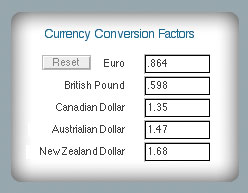

UPDATE: For our foreign readers, fotoQuote has listed the conversion rates for currency. Those shown at right are the default figures, but what with exchange rates fluxuating, you may change the rate as markets change. In addition, if for whatever reason, you think that these real-world surveyed rates need a tweak, you may make an adjustment to a specific use, or an across-the-board percentage increase to all the rates!

Please post your comments by clicking the link below. If you've got questions, please pose them in our Photo Business Forum Flickr Group Discussion Threads.

[More: Full Post and Comments]

Thursday, December 13, 2007

Your Photography Business: Get In The Mix

There are several different dishes I enjoy at restaurants around town. I have become a "destination diner", in that, I'll suggest we go to a certain restaurant because I am craving, say, Tortellini Rose from Paolo's, Tuna Tartare from BLT Steak, a Floating Island from Bistro lepic,  Pho from Pho 75 in Arlington, or my latest, Butterscotch Mousse from Johnny's on the Half Shell after last night's "after gathering" following the White House News Photographer's Holiday Party at the Capitol. However, if I had those dishes even once a week they would loose their appeal.

If every assignment I made was of a concert performance, or a lit portrait, so too, I'd be less excited by them. tonight I scouted a location for a book cover shoot on Monday, and photographed a holiday party for an association. Tomorrow (as you're reading this), I am doing a magazine portrait in the morning, and a corporate portrait in the afternoon, followed by a client's holiday party drop by (sans camera) and then a prospective client has called me to meet with them while they're in town to "look at my portfolio". Meanwhile, two of my colleagues are shooting a corporate assignment for me in New York City that has taken them and the biggest SUV I could rent along with a G5 tower and iMac and my Post Production Manager to deliver on-site files and immediate uploads for the client's review in Texas. (cha-ching!)


Diversity of a client base is one cornerstone of success as a photographer.

If all I did was portraits, or weddings, or events, or news, or documentaries, or....you get the point...just one (or a few things)  I'd have established a client base that is one-sided, or of just a few clients. An exceptional photographer friend of mine has just one editorial client. He's a freelancer, and he relies soley on them for all his work. Sure, it's a high profile client with sufficient work, but he's at the whim of that client's decision, and he could get the ax at any time.

How do you mitigate this situation?

(Continued after the Jump)
A mix of clients.

Yes yes, there are tons of photographers who specialize, and there is a wide cacophony of voices telling you you should specialize. And, well, yes that's a nice goal, but I've held to the belief that "have check, will take picture", works pretty well. Does that mean I don't try, on my own schedule, and on my own projects, to have a style/genre/etc? Maybe. But, as with too much Pho, or too much Butterscotch Mousse (I stopped after two last night), it begins to loose it's wow factor. 

Perhaps, for some people, portraying the family dog is a calling. For others, babies and their new moms, and again for others, their own muse. Yet, everyone from Ansel Adams to Bill Allard, to well...you know what I'm saying - all the greats - they do not do just what we know them for, but the school portraits (I've lost the image of Adams doing an outdoor school portrait that I once had, but it was a revised perspective that my young eyes once looked upon, seeing that in the lab at Black & White one day when I was getting....ahem...film processed...) and even Annie does corporate portraits (rumored to run $65k) when someone calls.

Who knows what I'll be known for some day. To me, being known as "...the greatest dad in the whole-wide-world..." by my daughters is what I hope to be most proud of, but maybe a picture or two will be remarkable. Then again, maybe not. I, however, sure enjoy the spectrum from Robert Plant to BB King to The President to a bush flight into Alaska for a book project to, well, again, you get the picture. Diversity not only rocks, it can ensure your longevity, and it's about the journey, not the destination.

Please post your comments by clicking the link below. If you've got questions, please pose them in our Photo Business Forum Flickr Group Discussion Threads.


[More: Full Post and Comments]

Saturday, December 8, 2007

Nikon vs. Canon - Introduction


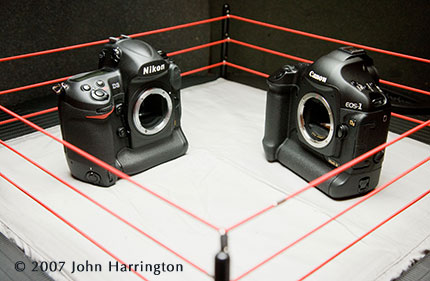
As previously reported, I ordered my Nikon D3 and my Canon EOS 1Ds Mark III at the same time, back in September. I'd recently also written about seeing a D3 "in the wild" when covering a White House event, and I was eager to get my hands on my own.

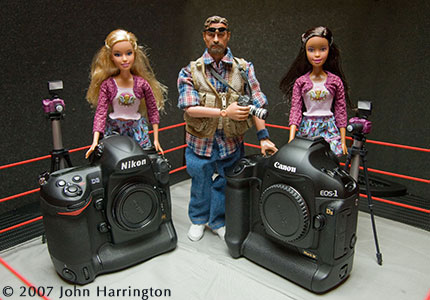
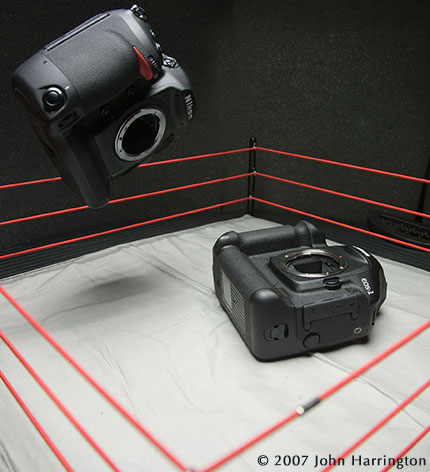
That surprisingly happened all on the same day, yesterday, Friday the 7th, when both cameras arrived, separately, from Adorama. The first thing I did was call my friend Mark Finkenstaedt, a die-hard Canon photographer, and invite him over to have a look-see at both bodies, as they were unboxed, make a few photographs of them, and with them, and generally have some fun with what is otherwise sometimes a dry "review".

(Continued after the Jump)

What follows is a muti-part review of both cameras. Since I own both systems, and am not endorsed by either, and in fact, have been critical of both, I think I can take an unbiased look at each camera. My most critical concern was noise, and I don't shoot sports, so, for example, fast focus-tracking is not a top priority for me. I'd dropped $20k on a Canon system, having been a die-hard Nikon photographer, having found the noise in my D2x files at iso640 and above offensive. Couple that with Nikon's failure to address or even acknowledge that elephant in the room was just down-right inconsiderate. Then, you have the absolute failure of Canon to admit to their focus problem in the 1D Mark III, until Rob Galbraith essentially (and rightfully) creamed them in his review, which all but shut down the entire new line of cameras. So, I too was a bit leary of the 1Ds Mark III.

I won't endeavor here to do a review like Rob will on his site. You can count on him to be much more technical and exhaustive in his review. I plan on looking at some external component/control issues, and to focus on the noise and chip size issues. But I can't do this alone, so I've asked three friends to help out. To protect their identities, we'll call them Barbie, Marcus, and Penelope. I've written about Barbie and Penelope here, and Marcus, well, Marcus is a mysterious man, and to learn more about him, you'll have to check out his website.
I've written this in multi-part series, since you may only care about a few of the things I am talking about, feel free to skip around. If nothing else, you'll enjoy the photos!


Please post your comments by clicking the link below. If you've got questions, please pose them in our Photo Business Forum Flickr Group Discussion Threads.


[More: Full Post and Comments]

Canon - A first look


The Canon certainly looks and feels like the 1Ds Mark II, which I am "graduating" up from. It has a nice feel, and the buttons are familiar. I am pleased because the arrival of this camera doesn't so much make my Canon system complete, as much as it just provides a nice rounding to the available equipment.

(Continued after the Jump)


Penelope sure likes the size of the body and chip, but as we'll soon see in the noise section, and as Penelope no doubt knows, it's not the size that matters. With the arrival of this body, The Mark II will become my backup body, and the Mark III will become my primary body when shooting Canon. The camera is taller, and as to grip, this body actually feels slightly better in my hand than the D3, although, as someone who is 6'7", with large hands, this may not be to everyone's benefit. The D3 felt a bit more suited to a smaller hand, and I know of many a colleague who prefers the 5D over the Mark II because they think the Mark II is just to big/bulky/heavy.
In addition, the Mark III sounds comparably noisy to the Mark II, in terms or mirror noise and shutter-cocking. Further, the sensor-cleaning capabilities make this an amazing camera all around. I expect to upgrade from my wireless transmitter from the Mark II when I can get the new one for the Mark III, and it's smaller size, and attachment to the side will make it a much nicer accessory than that bulky add-on to the bottom of the body as is the case with the Mark II.


Please post your comments by clicking the link below. If you've got questions, please pose them in our Photo Business Forum Flickr Group Discussion Threads.


[More: Full Post and Comments]

Nikon - A first look


It was nice to have a muscle-memory familiarity with the Nikon body. It's interesting that Nikon sticks with the dial/rewind-crank bump on the left side of the camera, as almost a throwback to the F-series of cameras. The button capability of the 8008s cameras seems like a much more functionally appropriate thing to do. Further, the dial there, as Mark pointed out, is a place for fine dust to collect, as compared to the canon button system on the top left of their bodies.

(Continued after the Jump)

This body will immediately become my primary camera when shooting with Nikon, and I will just hope that when it fails, or I have to switch to my secondary body for a quick-lens need (i.e. my wide is on there and my D3 has my zoom) that it only happens when I am comfortably at iso500 or below.

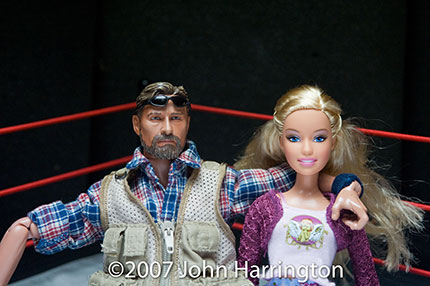
Barbie sure likes the camera's familiar look. In fact, so much so that I had to do a little retouching to the photo because she was showing her appreciation just a little too much when I reviewed the shoot after the fact. Perhaps I was just so focused on how great I thought the camera looked, that I was more interested in looking at the camera than, well, Barbie and didn't even notice until the images were up in PhotoMechanic. That must re-validate my geek card.

The body did feel a bit smaller in my hands than I would have liked, but that's a bias of having larger than normal hands. Most people I know who say they prefer the D200 over the D2x say so for capabilities purposes, not body size. Not so with the Canon's, where people just think that the Mark II camera is just too big size-wise, and they prefer the 5D because of the feel in their hands.

The camera is damn noisy. I didn't put a dB meter on it, but it sure is loud. Further, why on earth they would put self-cleaning technology on the D300 and not on the D3 is just an example of incompetence and lack of due consideration. However, where it really matters, in file clarity and noise, Nikon really shines, and I was duly impressed.


Please post your comments by clicking the link below. If you've got questions, please pose them in our Photo Business Forum Flickr Group Discussion Threads.


[More: Full Post and Comments]

Nikon vs Canon -The Noise Issue


As I said earlier, my primary consideration for adding a Canon system to my arsenal was the noise of the Nikon, so I was eager to see what Nikon had done, and I was blown away. I had seen friends' samples, and even had my hands on a beta of the D3 a month or so ago, but I wanted to do a comparison.

So, I asked Barbie and Marcus to sit for a portrait session.

(Continued after the Jump)

Here's the setting I used:

Here are the specs - both cameras are right out of the box. I made no adjustments to the camera's settings, beyond setting the iso and shutter and f-stops. Both cameras had a zoom. The Nikon had it's 28-70 f2.8, the Canon their 28-70 f2.8. Both cameras were zoomed in to 70mm.

The images were shot raw, and processed in Adobe's Camera Raw. I know many of you will suggest Capture One, Nikon's propriety software, and so forth. I am looking for a direct comparison using the same software. I could have used Capture One, I just didn't have it on my machine.

The files were converted to JPEG, and I wanted them to look their best so I made some nominal adjustments to brightness/color to get them close. Again, I am concerned about noise. Comparing the untouched result wasn't functionally of interest, since I expect that all photographers will not pull a raw file and convert it to jpeg without looking at it and deliver it to a client.

If you'd like to download the resulting JPEGs, I have a flickr group set up, feel free to click here and download the full rez files.

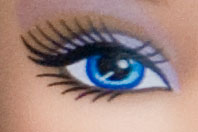
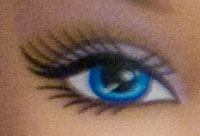
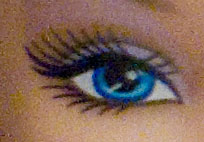
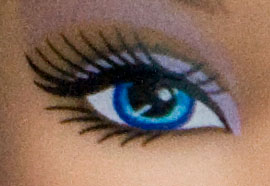
In order to give you a one-to-one comparison, I have cropped deep into the photograph, so that you are seeing native resolution on Barbie's eye, not anything up- or down-rezed. I'll save that point for the section on megapixels.

First up is the Canon, at iso3200. This image is amazing in it's sharpness and clarity. The colors and blacks look sharp and crisp. I would be more than pleased to deliver a client an image at this previously verbotten iso.

Next up is the Nikon, at iso3200. Don't get tripped-up by the fact that the same crop delivers a smaller image, again, more on that in the megapixel section. Focus instead on the noise- or lack thereof. It's absolutely amazing. The color is smoother, and, as you'll see in the megapixel section, it up-rezzes better.

Next up is the Nikon, at iso12,600. Sorry, but Canon can't go that high. Look at the results! I would be comfortable delivering an image from a dark Congressional hearing, or a candle-lit church ceremony with this iso. The colors are more than fine, as is the sharpness. Moreover, the noise looks more like film grain than the noise of days gone by. The noise in the Canon above looks less like noise than it's predecessor, but it looks more like noise than the Nikon does.

Next up is the Nikon, at iso25,800. Yes folks, that's not a typo. And, again, sorry, but Canon can't go that high. Can you say "I can make an image in available darkness?!?!" Again, the colors are more than fine, as is the sharpness. Moreover, the noise here again looks more like film grain than the noise of days gone by.

At 3200 and above, especially in Nikon's range, I would turn to my client and say "what do you mean I can't use flash for this assignment? I'll give you the best I can", and these would be my results.

One interesting benefit of Nikon's higher ISO's, is that if I can be at f2.8 at a 60th at iso3200 for Canon, I can be at f5.6 at a 60th at 12,800, and deliver a greater depth of field, with similar noise/grain issues. In addition, a nominal change to the sharpness in the camera's or Camera RAW's settings, and you'd have an even better image, I did not make those adjustments on any of these images shown. Thus, for ISO's, it's Advantage:Nikon.

I know my client would be more than pleased with these results from anything at 3200 and above from these cameras, when they previously didn't think they could get a usable image. Further, these crazy ISO's will be a nice differentiator when we can shoot without a flash (or a slight flash fill to give the subjects a pop) and the client will be saying "wow, I can't get that on my D80/5D, I can see what's happening in the background in yours, mine's all dark in the background - you're a great photographer, when can I hire you again?"


Please post your comments by clicking the link below. If you've got questions, please pose them in our Photo Business Forum Flickr Group Discussion Threads.


[More: Full Post and Comments]

Nikon vs Canon -The MegaPixel Issue


So, I was screaming mad when I learned that the D3's chip size was actually slightly smaller than the D2x (i.e., the D2x is 12.4MP, the D3 is 12.1; the D3 is, though, essentially full-frame). But, does it really matter? Well, that depends.

If you were someone who dropped $20-$30k on a medium format back, just to get a native resolution of 22MP, this camera's got to frustrate you, especially when you realize that the color depth of the Canon and Nikon is going to be so comparable to your MF back, that you'll feel comfortable shooting chocolate with these cameras.

So, what of the difference in chip size?

(Continued after the Jump)

The image specs and lens choices are the same as outlined in the noise section of this piece. In fact, since we're all worried about the size of the Nikon as smaller than the Canon, I'm putting up the Canon iso3200 here first to compare to the Nikon files I'll be showing.
Here again, so it's on the same page, is the Canon, at iso3200.


Here's the same Nikon iso3200 file, but it has been rezzed up to be the same size as the Canon file. No sharpening has been applied. It appears there is less noise, and it's smoother overall. I know it's not as sharp, but when you're so deep into this photo, either the viewing distance of the viewer or the reproduction abilities of the output device will all but take care of this concern.


Here's the same Nikon iso3200 file but it has been uprezzed and sharpened to my tastes. It appears equal to, or better than, the Canon image. In other words, by up-rezzing the file to the size of the Canon file, I can actually achieve a more pleasing final result than the native file results from the Canon.


Just for comparison purposes, here's the same Nikon iso3200 file as above, not uprezed, not sharpened. (in other words, it's the same file, just uprezzed, and then secondarily sharpened.

These results, for me, essentially kill the megapixel issue for me. Size, with the proper chip and internal camera processing software, is no longer a comparison point for me. I'm sure we'd have problems if there was noise at the ISO's I need, because enlargement would yield more noise, but since that's not a concern, it's amazing what a 12.1MP camera can look like when compared to a 22MP camera. My yardstick had always been based upon a conversation I once had with an editor at National Geographic. We were discussing, very early on when it was not digital cameras, but the scanners being used to scan film - that a file that was 60MB at 8-bit was scanning at pixel-to-grain 1:1 using Kodachrome 25 as the benchmark. So, anything over 60MB was just increasing the number of pixels that hold one grain of film, and thus, is overkill/redundant. I see that, properly done as Nikon has, it's not an issue at 12MP.


Please post your comments by clicking the link below. If you've got questions, please pose them in our Photo Business Forum Flickr Group Discussion Threads.

[More: Full Post and Comments]

Nikon vs Canon - Shooting Tethered


For many photographers, shooting tethered is a way of life. Not just studio photographers, but also on location, shooting direct into laptops and large digital workstations. Both Nikon and Canon, to varying degrees, previously failed on this front.

(Continued after the Jump)

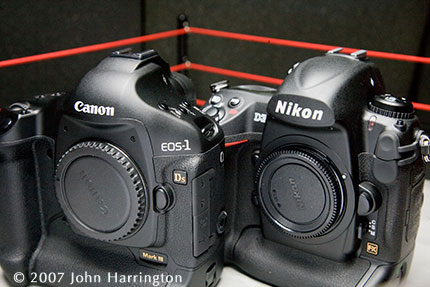
Previous Canons constantly had the cord falling out, and my colleagues were inventing ways to make sure it stayed in the camera, with mixed results. Nikons too, had similar problems. In fact, the D2x was a step backwards as far as security of the data cable was concerned. The D1x has a much more secure Firewire 400 port as a solution, and it also came out of the back of the camera.

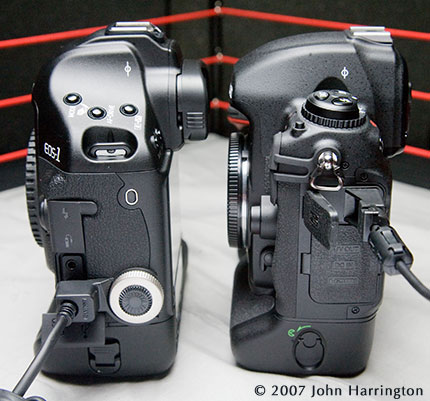
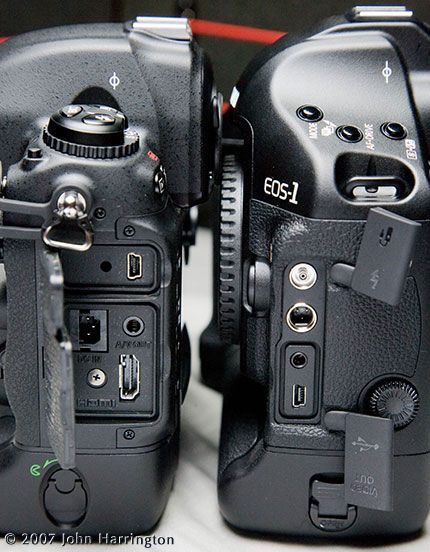
Canon has addressed this issue head-on, and in the most secure of the two. Canon's USB connects and is locked in place with a silver screw that slips into the side data port, with a place to store the cover on it's top. There's no way this cord is coming out of the camera, unless you unscrew it. The downsize, is that the plastic cable that holds the cable is a seperate piece, so too is the silver screw, and don't loose that data-port screw cap either. In addition to the cord there are three parts you can loose here. That's risky, and I hope that Canon stocks those for it's dealers. One major plus is that Canon includes a small USB cable for when you are using the camera to download to the computer, as well as a much longer USB cord so the camera can be much further away from the camera. This is about a $70 value and should not be under estimated.

Nikon, on the other hand, just wasn't thinking the issue through. They include a plastic piece that snaps onto the USB cord, and is not easily removed. This is a good thing relative to Canon. However, the little black hole next to the USB port on the camera is where the plastic pin on piece you connected the cord to slips in. It's shoddy, and will loosen even more over time. It wiggles and just doesn't make me feel safe. All they would have had to do was put a thread in that hole and make it a screw-pin through the plastic, and the piece would be about as secure as Canon's, with one less piece, and a lot less likelyhood that the pieces would get lost, since they're all securely connected to one another.

Further, and while unrelated to the point about shooting tethered, this photo illustrates it well, the Canon camera keeps you face further away from the back of the camera than the Nikon, meaning less smudge on the screen, and less "nose control" of the back navigation wheel/dial/plate.

Advantage: Canon.


Please post your comments by clicking the link below. If you've got questions, please pose them in our Photo Business Forum Flickr Group Discussion Threads.

[More: Full Post and Comments]

Nikon vs Canon - The LCD Screen


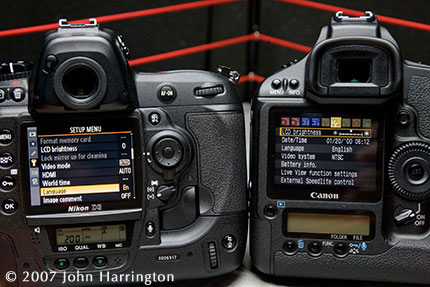
First, the math - Nikon's screen has 307,200 pixels , as compared to Canon's 230,000 pixels, so your preview screen is better on the Nikon's.

(Continued after the Jump)

The browsing is similar to that of the Canons and Nikon's of the past, however, I get the feeling that the Nikon is just a bit clearer. But, who's going to buy a camera because of the LCD screen? It's not like it's a cup holder decision in a car!

What might sway you to upgrade is Live view, and both have it. The screens are similar in terms of readability, and there's now a second navigation "joystick" above the one we're used to on the Canon, so you can navigate the screen without having to take the lock off the navigation wheel on the back.


Please post your comments by clicking the link below. If you've got questions, please pose them in our Photo Business Forum Flickr Group Discussion Threads.

[More: Full Post and Comments]

Nikon vs Canon - External Ports


One noticible point about the Nikon, is that it has an HDMI out, which I think, while not immediately beneficial to me, I can see the benefits of in the not too distant future. Canon is stuck with just the standard A/V out we're all used to.

(Continued after the Jump)

One of the other ports is the power port. On the Nikon, it's tucked in here under the flap, and easily accessible. On the Canon, you have to remove the battery and insert a separate battery sleeve with the AC cord connected. One potential issue here, is that if the Nikon suffers a momentary loss of power from the AC, it's battery will probably keep it on, whereas with he Canon, you'd be back to whatever your settings were before power-off.

I do, however, like that you can (continue to) remove the plastic covers over the ports if you want to, from the Canon. For the Nikon, it's not possible, unless you cut them, and don't do that.

Lastly, I'll just point out the three buttons on the top left of the Canon here, as compared to the button/wheel/dial combination on the Nikon. Remember this in the next section on buttons and access.

Advantage: Nikon (2x)


Please post your comments by clicking the link below. If you've got questions, please pose them in our Photo Business Forum Flickr Group Discussion Threads.

[More: Full Post and Comments]
Newer Posts Older Posts